If you’re keen on saving cash, getting on the right energy deal is a must – but for those who’ve already fixed, savings shown on comparison sites aren’t what they appear to be.
Comparison sites are a great way of seeing what tariffs are on the market and how much they’ll cost you over a 12 month period. They also let you easily make a switch. If you pay a standard (ie not fixed) energy price, you can possibly save up to £200 by fixing your supplier.
If you’ve already fixed, it’s another matter.
I’m regularly fixing and switching my energy provider to make sure I’m on the best deal possible. My deal has another six months to go, but when I looked this week at a few comparison sites, I was told I could be saving over £100 a year. Yes there are new companies out there undercutting the big boys, but since I last fixed, prices have gone up. £100 was just too much. Something didn’t ring true. So I’ve investigated.
How comparison sites work out savings
Common sense says a comparison would be between my existing deal and the newer tariffs available. So if I’m paying £x for each kilowatt per hour now, the new prices shown will be based on £y for each kilowatt per hour. Then any saving would be the difference between the two.
Here’s how USwitch, MoneySuperMarket, Which? and many of the others actually do the calculations. They all use personal projections of the next 12 months. If a fix ends during that time, it uses the prices from your networks standard tariffs for the remainder of the year. Some also factor in seasonality – so more gas in winter.
You’ll struggle to find explanations on many of the sites. MoneySuperMarket is one of the websites which actually gives an example of how a comparison is calculated:
They say the remaining 35 days on a fixed tariff costs £100
Then the 330 days left in the year on a standard tariff would cost £1300. That’s a total of £1400
The new tariff they find would cost £1225 a year, meaning a saving £175.
How is that different to my expectation of how it would be calculated? In the above example, 12 months of the original fixed tariff would actually cost £1043. That means the new fixed tariff would cost £182 more a year.
So splashing a big “You’ll save £175” on the comparison results feels misleading. The majority of the sites would have you think you can save that much money by switching now. Actually each year you’d be paying £182 extra than you currently do!
You’re probably be paying more by switching early
The personal projection system does work for people who pay a standard – non fixed – price. But those who have fixed before are surely likely to fix again?
Once there’s less than a year of a fix to go, anyone who compares deals would probably see an annual saving in their results. This is dangerous as people could be switching early based on this saving. Instead it’s likely they’ll be out of pocket!
How do you accurately see what you could be paying?
There’s no easy answer as all sites are different. My advice is to:
Use exact figures from your bills to show how much energy you use in a year
Ignore annual saving figures
Look for the lowest new annual cost. If it’s more than you’re paying now, stay with your current deal until just before your fix ends.
Ideally only compare when you’ve two months left of your fix (it can take this long to switch) or if there is a price drop.
The system does work for those who haven’t fixed and are on standard tariffs though. If that’s you, savings really could be as much as £200. You can read about how to do it in my 7 Steps to cheaper energy guide.
Why aren’t sites clearer?
It was surprising how difficult it was for me to find out information on this. I couldn’t find any details about how sites such as CompareTheMarket and Confused.com perform their calculations, while it wasn’t easy to find on sites which did (MoneySuperMarket, uSwitch and Which?).
It looks like Ofgem (the government’s energy body) want to make “Personal Projections” a requirement for accredited comparison sites, which would make this worse. I found this response to a government consultation from Money Saving Expert showing they’re against this system for the same reasons as me, but it implies that they too calculate this way.
There’s lots in the press about comparison sites needing to be open about commissions – how about they’re open about how they compare too?
Last month there was a story in the papers of a lady who’d not checked the total on the card reader when entering her pin. Rather than £35, she’d agreed to pay £35,000!!!
That was a freak event, but it’s easier than ever, especially for small amounts where you pay for contactless. How often do you actually check your receipts or bill totals when paying?
I’m admittedly a little bit anal when making sure I pay the right amount, but even I can get caught out.
A few weeks back I went for a ‘team lunch’ with some colleagues from my 9-5. I’ve written before about the awkwardness of splitting the bill evenly (and why you shouldn’t ever feel you have to if you can’t afford it), and fortunately I was with some like minded people.
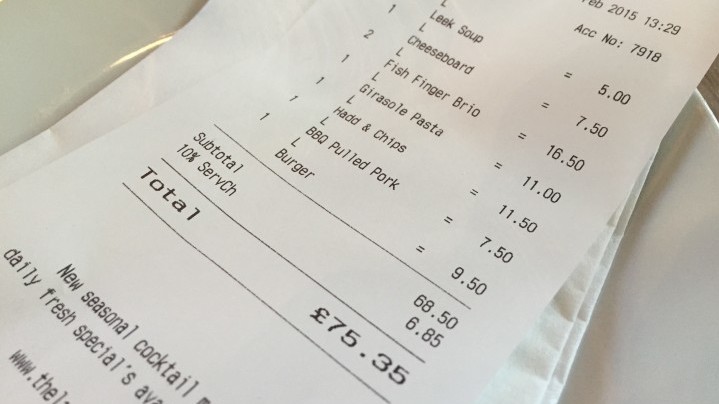
What surprised us wasn’t that we’d been charged for things we didn’t order (something it’s worth always checking for). Checking the bill, we’d actually been charged more for most of the dishes! Five of our seven dishes were all billed at higher prices than listed on the menu, ranging from 25p extra on a fish finger sandwich to a crazy £2 markup on a cheese board.
If we’d just looked at the total and split it seven ways, we’d all have paid extra. Ok, so it wasn’t a huge amount. Maybe just £4.50 total. But if we’d had starters, desert or drinks it could easily have been much more.
(Side note – the pub easily had 100 covers for lunch. If they overcharged everyone, they’d have made a decent cut over a whole day, week and more. Not good! For info it was The Last near Chancery Lane)
It can be hassle, but I’d recommend always asking for a receipt (including when you use contactless at the pub) and checking you’ve been charged the right amount.
If you find there’s a mistake, say as soon as you notice. It’s best if it’s before you pay or just after, but it’s worth following up even days or weeks after.
Again this was only small change, but a few times I’ve been caught out at supermarkets when reduced items have gone through full price. With one item that should have been 45p coming up as £4, I used online chat with Tesco to let them know what happened. Five minutes later I was offered a full refund and double the pricing error.
You might not want to bother with small amounts, but little savings are well worth getting if they’re not much hassle. They really can add up over the weeks and months.
Unlike the famous Nine Circles of Hell by Dante, the Talk Talk customer experience hell only has seven levels. But they are a living nightmare and I’m struggling to find my way out.
You might remember back in the summer I wrote how I was leaving Talk Talk when they put their prices up. Well, we ended up staying in order to keep the YouView box which had programmes we’d recorded we still hadn’t got around to watching (and still haven’t in some cases!).
I really wish we hadn’t.
And it’s not because of the data hacking (though that doesn’t inspire confidence).
Instead it’s the all-round appalling quality of the product and customer service. I’ve spent at least four hours this week on the phone and webchat with them to try and sort some problems, and I’m not getting anywhere!
Here are the horrors I’ve faced this week dealing with Talk Talk and their customer service.
Talk Talk Hell Level 1: Never ending frustration
Since day one we’ve had issues. To Talk Talk’s credit they’ve normally been pretty good at trying to fix the issue, and compensating me when they ultimately couldn’t.
But the latest trio of issues are the last straw. We’re paying for a service which doesn’t live up to the initial promises and it’s not good enough.
Talk Talk Hell Level 2: Talking to yourself
It feels like there’s a script the generic customer service agents have to follow, and in turn it feels like they aren’t actually listening to what you say.
They don’t seem to be able to deviate from the processes laid out in front of them. There’s no ability to use common sense or respond to what I’m actually asking.
Talk Talk Hell Level 3: Stuck on repeat
It’s like Groundhog Day. I have the same conversation each time I speak to them.
Each one starts with me explaining the problems and ends with the very same outcome – the promise of another phone call – which starts the cycle again.
Talk Talk Hell Level 4: No solutions
Of the seven people I’ve spoken to this week, not one actually tried to fix the problems I report. No solution suggested. No request to try this, or attempt that. Nothing.
They say it’s because they can only deal with problems happening now (ours are intermittent), yet there’s an inability, perhaps unwillingness, to offer any practical help.
Talk Talk Hell Level 5: Hitting a brick wall
At one point I managed to get transferred to a woman who could have a two way conversation. This time she didn’t just follow the script.
Unfortunately she was rude, accused me of lying, obstructive, patronising and spoke over me
I tried to get her to reason. I appealed to her good nature. No matter what I said, there was no way past. Ultimately she was the equivalent of a huge immovable brick wall.
It was possibly the worst customer service experience I’ve ever had.
Talk Talk Hell Level 6: Despair
After the most recent call, all I could see in front of me was a never ending cycle of never actually having anything happen.
It’s so frustrating that I was very nearly tempted to just pay the £130 exit fee. I wouldn’t be surprised if that’s their whole intention.
Talk Talk Hell Level 7: Limbo
This is where I currently am. Talk Talk won’t try to fix anything unless the problem is happening when we speak. They won’t send an engineer without a charge of £65 until they’ve tried to fix it over the phone. But the issues are intermittent, and sometimes brief. It feels like it’s never going to get fixed.
As I see it I’m faced with three choices:
Trying to cope with a service that doesn’t deliver.
Paying the exit fee and taking the financial loss.
Make an official complaint and see where that gets me.
The first isn’t good enough. The second doesn’t sit well with me. So I’m going to go with the latter. Wish me luck.
My rules to making sure I get the best value from reduced food – and don’t get carried away by the yellow stickers.
If you regularly read my blog, you’ll know that even though I love getting a bargain, I’m a realist too and will pay what I need to pay for the life I enjoy (yes, even if it is full price).
But I’m pretty disciplined and rarely buy things I don’t need. I’m a lean, mean saving machine. I’ll always find the best deal, and I’ll always make sure I’m getting the best value for my money.
Well, nearly always. I have a slight money saving problem. I’m addicted to the yellow reduced stickers in the supermarket.
My yellow sticker addiction
What’s the harm in that you might say? Well, I’ve become aware (isn’t acknowledgement the first step to sorting a problem?) that I can’t walk past a supermarket without wanting to check for reduced items.
I do sometimes just think about it and carry on walking, but if I’m honest it’s only because a) I’m going somewhere, or b) the freezer is already full.
But pretty much every other time I’ll pop in to see what’s there. Most nights after work I’ll go to the Sainsburys under my office (often chock-full of yellow stickered items), then past the tube station a few meters to the M&S Simply Food, just in case there are big reductions.
Going the extra mile
Sometimes I’ll take a longer walk to a different station. I say it’s a fitness thing, simply getting a little exercise in, but a big part of it for me is seeing if I can pick up some bargains at the Sainsburys, Co-op, Tesco, M&S and another Tesco I’ll go past on the way.
Bizarrely this is only with supermarkets, not other shops. I can easily walk past places selling clothes, tech and trinkets and not even notice massive sale signs.
Far too excited
Once in the supermarket, big or small, I’ll generally make a bee line for the reduced-to-clear aisles. The limit to what I buy is really down to the space in the freezer or if I’ll be at home enough to eat the food before it goes off.
If some mince costs £4 and is reduced to £3.60 I’ll probably ignore it. If it’s £3 I’ll consider it. When it’s down to £2 I’ll snap it up. If it gets towards £1 I’ll be far more excited than a grown man should be by the price of mince.
Some self control
I do have some dignity. I won’t hang around while the shop staff are reducing, ready to pounce, but I do loop around the aisles and come back, which is only slightly less stalkerish.
I’m also not someone who times my supermarket trips for the biggest reductions, though I expect I would if I knew when that was!
My four rules for buying reduced food
Of course, getting reduced food is a good way to save cash. The haul in the main photo should have cost £30 but I only paid £7.50 – and I could have got more if I had space in the freezer!
I’m not sure how to stop my addiction to yellow reduced stickers other than just willpower, but to make sure I don’t spend for the sake of it, I’ve come up with these four rules.
I only buy what I need
Food waste is a huge problem in this country, both ethically and financially. So I’m sure to only buy reduced food I’m confident I can eat or freeze before it goes off.
I only buy food I’d want at full price
In the past I’ve been guilty of buying reduced food just because it’s cheap. But now, even if that pasty is only 20p, I won’t buy it. It’s better I pay full price and enjoy what I’m eating!
I only buy if it’s a ‘good’ reduction
Simply because it’s got a yellow sticker doesn’t make it a good price. Mysupermarket is a great app to test whether it’s actually cheaper on offer elsewhere.
I’ll check my receipt
It’s easy to miss something going through at full price – just last week I was paid £2 too much.
A budget hotel at a budget price – but sometimes you really should pay more.
Even though I now live in Yorkshire, I still regularly head back to London. Last weekend was one such time. I was down for three days for my last day in my full-time job and a two-day festival, meeting up with different friends each day. Though I could have sofa-surfed each night, I’d had to bring a small suitcase with me, and I couldn’t take that to the festival. So I looked for hotels.
Now these aren’t cheap most weekends in London, but as this was a bank holiday prices were sky high. Fortunately, EasyHotel ran a flash sale, and I managed to get three nights at the EasyHotel in Croydon for a total of £95. It was a bit further out that I’d have liked, but a lot cheaper than a more central location.
At that price I expected things to be basic – which they were – but I didn’t expect what actually happened during my stay which . So I’ve broken this review down into two parts. The uneventful first two nights, and the stressful, sleep-deprived third night,
My first two nights – the EasyHotel review
The room was very basic. But I knew it would be. I’d paid a little more to get a room with a window, though these aren’t rooms you’re going to spend much time in even if you do have a little natural light.
The room contained two single beds. That’s pretty much it. No wardrobe, TV, side tables or stand for your luggage. There was a fixed coat hanger which I used to hang my towel after showering.
The bathroom was also very basic and very small, managing to cram in a loo, a sink and a shower. But it worked fine – though the single soap/shower gel dispenser didn’t pump so I had to take the lid off and scoop to wash my hands!
I actually slept OK both nights, though it was a very hot weekend and the fan wasn’t great. But I actually thought it’s not a bad place for someone travelling on their own. However, I wouldn’t have stayed there with another person – there just wasn’t enough room.
As I was on my own I used the second bed to lay out my suitcase and other things. If I’d had to put it on the floor it would have been incredibly difficult to get in and out of the bed and move around the room. Double rooms are no different, you’ve just space both sides of the bed rather than between the beds.
(Oh, a side note, there was a very random “shop” off the main lobby dedicated to all things “Easy”. Such as free luggage tags for EasyJet and beach balls for EasyHolidays. A really big shop and really weird. I’ve no idea why it exists.)
Here’s the very small room!
My third night – a stay is about more than a room
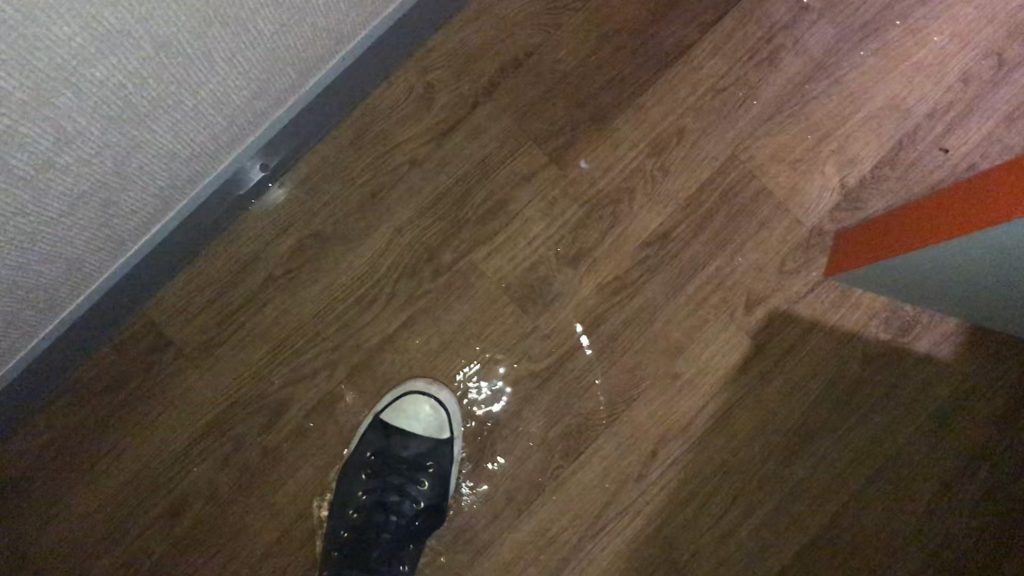
My festival was in East London and finished at 11pm, so I didn’t get back to the hotel until around 12.30, where I found all the guests waiting in the lobby. Other guests reported water streaming down walls and through light fittings and electrical sockets. Water was visably dripping through the ceiling in the hallways, and the leak went all the way from the seventh floor down to the toilets on the ground floor by reception. Guests were a mix of upset, angry and confused, and above all concerned for their safety. It certainly didn’t seem like a good idea to go back to the rooms!
Here’s the water dripping through the light fitting outside my room
The fire brigade arrived just before 1am and left not long after. I didn’t speak with them but other guests reported them as saying people really shouldn’t go back to their rooms. When EasyHotel’s maintenance crew arrived at 2am they found water had also come through the main electrical switcher cupboards, as well as knocking out some of the fire alarms. I was told that really no one should have been allowed back into the hotel until this had been checked and repaired.
However, the communication from the staff member was all over the place, saying both go to your rooms and don’t go to your rooms, sometimes in the same sentence. And at no time did anyone from EasyHotel head over to help the beleaguered desk clerk (when I checked out out the next day at 8.30 am I was told the manager himself wasn’t due in until 10am!) Whether it’s poor training or just the lack of a crisis management process, the situation was handled awfully.
And this is the major reason I’d not stay in an EasyHotel again. Ok, there wasn’t another incident that night, or cause for a further evacuation, but if there had been I’ve no confidence in the equipment or the competence of the staff to get everyone out safe. Even when I’m paying less for a basic room, I still expect there to be processes and standards in place that don’t affect my safety. You can’t cut corners on heath and safety.
But there’s another reason I’m giving EasyHotel the thumbs down.
During all this I found a disabled couple on the fifth floor who had been left there since the alarm went off. They were very distressed, and not clear what was going on. I made the desk clerk aware of this, and asked him to prioritise helping them – either directly or by getting someone from further up the chain to assist. This did not happen. I was told it was not possible to rehouse them at a different hotel. The disabled couple did manage to get downstairs on their own around 3am, having had no contact from the staff, with the woman in tears. They were still in the lobby at 8.30am when I left for my train.
I think this is appalling. There was another disabled guest who was also virtually ignored, though she’d made it down to reception on her own earlier. Yes it was stressful for the staff member, and yes the fire brigade hadn’t evacuated the hotel, but the treatment this couple got was just not on, and it’s something EasyHotel needs to address. Another reason why I won’t be giving any more money to EasyHotel.
At least I got my money back
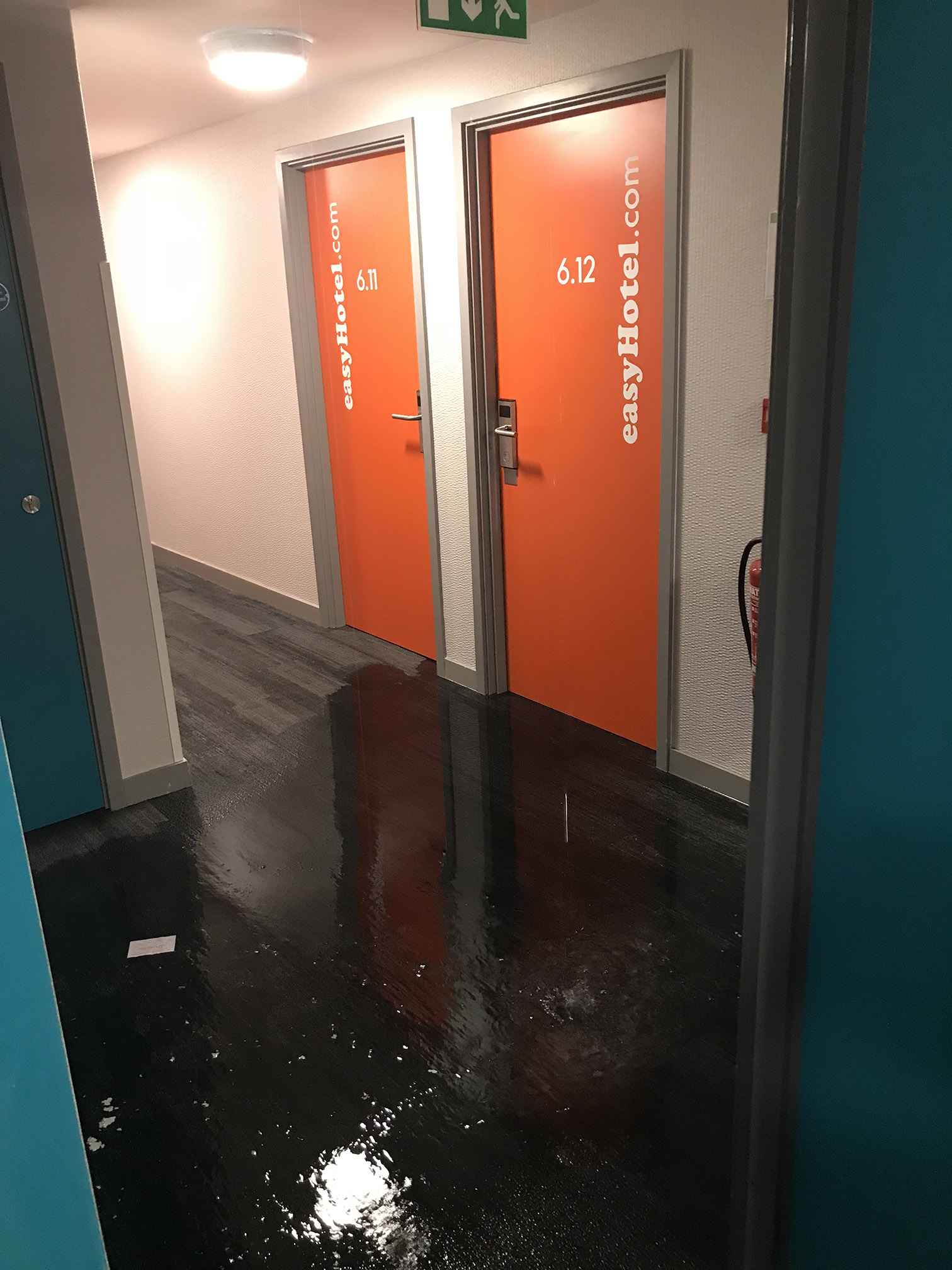
As for me, well my room on the sixth floor was one of those flooded. It was lucky I had put my suitcase and belongings on the second bed as otherwise it would all have been sitting in a centimetre of water. Ok, not great. And I’d obviously not be able to sleep there that night. Though the hotel was apparently sold out, at around 4.30, as one of the last remaining guests still unable to return to their room, I was finally given a new room that wasn’t flooded. I got about three hours sleep before I had to go!
The next day I was offered the money back for that night and a free stay back at the EasyHotel Croydon. No chance. However, a few more emails and I got the money back for the whole stay – another example where it pays to ask for what you want and not take what you’re offered when you complain.
The flood in my room!
What EasyHotel say
I asked EasyHotel to respond to the following questions, and you can read their responses further down the page. I’ve offered to discuss what happened with them further, so we’ll see what happens.
My questions for EasyHotel
1. Why did the hotel manager or a senior member of the EasyHotel/EasyGroup team not immediately begin travelling to the hotel to help deal with the issue?
2. What is the policy for evacuation and returning to rooms after a fire alarm?
3. What should have happened with disabled guests when a fire alarm is raised?
4. Is there a policy to rehouse at-risk guests? If so what is it?
5. What is the “crisis management” or equivalent policy to assist the member of staff and communicate with upset/angry guests?
6. Which of these policies were not followed, and why?
7. What training is given to members of staff to deal with situations like this?
EasyHotel’s reply
‘Parts of London experienced torrential rain on Saturday night. Unfortunately, some rooms in our Croydon hotel were affected by flooding due to the extraordinary volume of rain that fell.
The Fire Brigade were called to attend by the Hotel management team as a precautionary measure. Clearly this was disruptive, but guest safety is our number one priority.
Clearly, this was a significant and complex disruption in the middle of the night and we have apologised to all guests affected for the inconvenience caused. Guests were offered a late-checkout due and all affected guests have been offered a full refund.
At no time did the Fire Brigade advise evacuation. Had they done so, we would have acted immediately. Guests were never in any danger and all electrical systems in the hotel are fully protected from water. Our crisis management policies were followed. On the Fire Brigade’s advice we moved affected guests to alternative rooms in the hotel once we had been given the all-clear. Only two rooms were taken out of service as a result of the flooding.
For guests with impaired or limited mobility we have a Personal Emergency Evacuation Plan. Had the Fire Brigade asked us to evacuate, the plan would have been enacted immediately.
Our staff worked hard, in challenging circumstances, to resolve the incident. We have instructed a contractor to review the capacity of the Hotel’s drainage and guttering system to ensure that this freak incident does not recur.
With any incident, we carry out a post-incident review. Guest safety is our number one priority. If there are lessons to be learnt, we will do so and revise our policies accordingly.’
Price per unit is a great way to find the best value at the supermarket – but it can also be frustrating and potentially misleading.
Logic says anything in the supermarket labelled “Value pack” or part of a special offer is going to be the cheapest option. Sadly that’s not always the case, which is why I’ll often recommend using the price per unit to compare exactly how much you’re paying.
But at the same time, inconsistencies can make that comparison difficult. Call me cynical, but as you’ll see from the list below, I can’t see many decent justifications for not making it simpler – other than a deliberate attempt to confuse shoppers.
How price per unit helps you find the best value item
We generally use the same standard units in UK supermarkets. Weight is always in grams or kilograms – no need to worry about pounds and ounces. Volume is almost always in millilitres and litres.
Simply by checking the shelf label in the aisles or the slightly smaller print online you can quickly see just how much the pack your buying costs per standardised unit – normally something like per 100g or per 100ml.
So there’s no need to work out in your head whether the 1.25kg pack at £2.60 is actually better value than two 500g packs at £2.15. The maths has been done and is displayed right there below the price. (It’s actually the bigger pack at £2.08 per 100g vs £2.15 per 100g).
And with an increase of shrinkflation, where brands make pack sizes smaller but keep the prices the same (or just have a load of dead space in the box), you’re also better able to spot when the pack that looks like it’s a litre is now 875ml.
It really is a great tool – possibly the best one out there – to help you get as much or as little as you need at the supermarket for the lowest price. Great.
When price per unit doesn’t work
But sadly it’s not perfect. In fact, as useful as price per unit is, it can at times be misleading and confusing.
To help you avoid getting caught out, I’ve compiled this list showing where you need to watch out, and a few tools to help you get the right numbers.
Comparing special offers
This is the biggest fail by supermarkets with price per unit. More often than not the shelf label isn’t updated to reflect special offer pricing. And this makes it tricky to work out the cheaper of two similar products on different offers.
I’ve found this online too. In the past I’ve noticed the selling price has been lowered but the old price per unit hadn’t been changed. So watch out!
The app MySupermarket can help here though as it handily displays both the normal price per unit and the special offer price per unit. So you can see exactly what the different the deal makes.
Comparing conflicting units
From time to time you’ll see different measures used for similar items.
A good example is mayonnaise. At Tesco you can currently buy an 600g jar of Hellmann’s mayo for £2. There’s also a 750ml pack of mayo for £2 – also made by Hellmann’s. So which is best value? Well there’s no point checking the price per unit as the first is given per 100g and the second per 100ml.
I’ve also seen milk priced per pint next to milk priced per litre. Again, not a like-for-like comparison.
There’s no real reason for the differing units, so it feels like a deliberate attempt to confuse shoppers.
Not comparing like with like
Some items are similar but not the same, so comparing price per unit doesn’t really help. I’ll give you an example.
Apart from quality, toilet and kitchen rolls are pretty much the same right? So comparing price per roll seems a fair enough. Except it’s often pretty pointless. What you can’t always tell from the packaging is how many sheets are on the roll. So a pack at 45p a roll might actually be better value than one priced at 35p a roll.
However price per roll is still useful when comparing the same brand in different sizes.
Comparing processed vs non-processed
We recently needed some pistachios for a recipe. The nuts still in their shells were far cheaper at £1.50 per 100g than those that had already been shelled, at £2.86 per 100g. Of course, the price per 100g also includes the weight of the shells. But how much?
We bought the cheaper pack of nuts in shells and I weighed out 100g. Then I removed the shells. That left me with 40g of edible pistachio. So the real price per 100g was £3.75 – almost a quid more than the other pack.
It similar with meats. OK, two packs of chicken breasts might look the same, but the unknown ingredient is how much water has been added in. You might actually be getting more meat for your money with the pricier option once it’s been cooked.
Obviously you’re unlikely to be able to work this out in the shops, making the price per unit figured not much use. At best you can use them to guess.
Comparing confusing units
This problem occurs when one pack is labelled, for example, as price per 100 grams, while the neighbouring pack is in kilograms. Ok, so you only need to add a zero to the price per 100 grams to make them comparable, but really this shouldn’t happen.
You see this with volume too, with an item priced per 100ml next to a similar item priced per litre.
Comparing price per items rather than weight
Let’s say you want to buy some bananas. You’ve a choice between loose or prepackaged. To find out which is cheapest I’d check the price per unit. But more often than not, the loose bananas are by priced by weight and the prepackaged bundles by the number of bananas. This leads to the frustrating “price per item”.
This is pretty common across fruit and veg. Sadly the only way to work out for sure is to weigh the single, loose item to find out how much it costs. This will give you a comparable price per unit. But it is a bit of a faff – I certainly wouldn’t bother.But that could well mean you’re paying more than you need to for the practically the same item. And there’s no rule to say loose is always cheaper or visa versa.
Elsewhere it’s more difficult to compare when this happens. You sometimes see price per biscuit, while eggs are all per egg, regardless of size.
Ignore big name brands and find cheaper alternatives for pills and drugs that do the same job.
Some articles on the site contain affiliate links, which provide a small commission to help fund our work. However, they won’t affect the price you pay or our editorial independence. Read more here.
Paid advertisement
Off-the-shelf medication
When you’ve got a cold, you’ll ask for Lemsip. When you’ve got a headache, you’ll ask for Nurofen. When you’ve got a hangover, you’ll ask for a Berocca.
Yes they cost more than own brand, but surely that’s because they’re better at making you feel better?
Well, it turns out there’s little or no difference between many similar medications. In truth you’re usually paying over the odds for name recognition. And this isn’t the only time you might be paying more than you need on medication and prescriptions.
To help you make a decision that’s good for your wallet as well as your health, I’ve taken a look at some of the ways you spend too much on medications and how to save some cash.
Branded medicine is one of the biggest rip-offs we fall for. The vast bulk of the time the ingredients used to make the tablet, cream or sachet are pretty much the same as those cheaper alternatives on the shelf below.
There might be slight variations, but it’s unlikely they are enough to make a difference to your ailment.
You might also have to hunt for these cheaper options, generally hidden on lower shelves with the big brands at eyeline and easy to grab.
Our podcast
Listen to Cash Chats, our award-winning podcast, presented by Steve Alderton and Editor James Andrews.
Here are a few examples of the price difference I found:
Lemsip vs own brand cold medicine
In Boots, a pack of 10 Lemsip Max sachets will set you back £6.80. The own-brand alternative is just £3.20, saving you £3.60. The ingredients are almost exactly the same. And they’re cheaper again buying the own-brand options in supermarkets.
Nurofen vs own brand ibuprofen
Worse is ibuprofen. Standard Nurofen costs £2 for 16 tablets in Boots. The own-brand version is £1.49. But better still is the value pack at just 55p. And they all contain the same simple ingredient: 200g of Ibuprofen.
The only difference is likely to be in the coating, which won’t make a difference to the effectiveness of the pain relief.
Berocca vs own brand effervescent
Berocca meanwhile costs £5.90 for 15 tablets. The Boots own brand equivalent of the effervescent multivitamin is £1.99 for 20 tablets. That’s 10p per tablet rather than 39p for pretty much the same thing. In fact since the Boots tablets are bigger you actually get slightly higher doses of each vitamin.
Watch this video where I share how to see if items are the same or similar
Exact same products, different packaging
You can even find some products which are exactly the same! In my mini-investigation (i.e. trying to subtly take photos of packaging in Boots) I found an example where the tablets in different packaging were the very same.
Both Panadol Extra Advance and Panadol Period Pain are the same product. They have literally just been put in different coloured packs (you’ve guessed, it’s pink for the period painkiller).
The way to tell is to look for the product line code. This is the letters PL followed by some numbers. If the code is identical then so is the medication. You’ll find this on the box.
Now, these two Panadol items should therefore cost the same, right? Well there’s a 10p difference at Boots (surprisingly it’s the one aimed at women which is cheaper). Ok not much money but you get the idea.
And bigger savings are likely to be found when comparing own brand versions of meds in different shops. It’s possible that you might find the exact same formulation at a far lower price.
When I looked a few years ago, I also found that the Boots, Tesco and Asda cold and flu items had exactly the same PL number but at varying costs. So exactly the same item made in the same factory!
I think it also raises a question as to whether these targeted meds are actually anything other than marketing. You could well be better off with the standard version.
Get the best of our money saving content every week, straight to your inbox
Plus, new TopCashback customers get a high paying £18 welcome offer
Paid advertisement
Will a prescription be better or worse?
Hopefully your GP won’t prescribe you standard, everyday items like paracetamol that you can buy for less direct from the shop, but it’s worth double checking. Things like eyedrops, steroid creams and more might cost less without a prescription. A pharmacist will let you know if you’re not sure.
However some items will be cheaper if you can get it prescribed, so if there’s something you’re taking regularly do ask your GP if they’ll do this. And don’t forget prescription subscriptions that can work out cheaper too.
And of course, if you’re outside of England, under 18 or over 60, then you won’t pay for any prescriptions, so see if that’s an option for what you need.
The same goes if you are prescribed anything privately. If your GP will fill out a prescription from them instead, it’ll dramatically cut what you pay.
Sky has introduced a new loyalty scheme promising free movies, downloads and discounts on set up fees. I’ve taken a look at what Sky VIP is, and whether it’s any good.
If I’ve said it once, I’ll say it again. Loyalty rarely pays. Yes it’s nice to get the odd freebie or discount for using a brand, but it’s a very rare reward scheme that makes it worth signing up to a company and staying with them as you can usually save more by taking your business elsewhere.
So the Sky VIP needs to be something very special to buck the trend.
What is Sky VIP?
If you are a Sky customer – whether that’s for one day or a couple of decades, you will be able to sign up for its new loyalty scheme.
There are four tiers depending on how long you’ve been with Sky. Entry level, available to all customers, is called Silver. You move up to Gold, Platinum and then Black the longer you’ve been with the satellite and broadband company. If you leave and come back to Sky you start again at zero years.
Each level offers different benefits
Sky VIP Silver (0 – 3 years):
Free DVD and streaming movie from Sky Store
Access to free movie, event and sports tickets
Sky VIP Gold (3 – 8 years):
Free Sky Go Extra to download programmes when out and about
Sky Atlantic VIP – a new channel previewing shows 24 hours before everyone else
Sky VIP Platinum (8 – 15 years)
Free Fibre set up
Free data boost if you have Sky Mobile
Sky VIP Black:
Free Sky Q set up
Priority customer service and dedicated support phone line
Is Sky VIP any good?
Let’s take each of the rewards one by one.
Silver rewards
If you are with Sky, then the free movie for all customers is nice. But in reality, this is worth £13.99 at most. You can save that in ONE month by switching from Sky TV to NOW TV.You’d then keep on saving as the months go on – and you’ll still be able to watch all the Sky TV channels.
Ok so NOW TV is just on demand, meaning you can’t record, but is that saving of more than £200 extra a year better than being able to store programmes (most of which you know you’ll never get around to watching)? I’d say it is.
The free cinema and sports tickets sound good don’t they. But how on earth can they give every customer a free Premier League ticket? They can’t. It’ll either be through prize draws or go to whoever has the fastest reaction when tickets are released. I’d take this offering with a pinch of salt.
Gold rewards
Right, the free Sky Go Extra, worth £5 a month, is actually a pretty nice reward if you think you’ll download programmes for your commute or on holiday. However, I’d still recommend switching to NOW TV instead and then using some of the savings to pay for Netflix or Amazon Prime. These have downloads as standard and you’d have access to even more content to consume!
As for Sky Atlantic VIP… well if I end up having to wait an extra day to watch Game of Thrones I won’t be happy. But with huge efforts to cut down on piracy such as simulcast with the USA, I don’t envisage this applying to every show. And with most programmes I think we can all wait 24 hours. It’s certainly not worth paying over the odds to stay with Sky for.
Platinum rewards
These are pointless.
If you don’t already have Fibre internet the setup discount will save you at most £50 – but you’ll still have to pay more each month for the service and this could be cheaper with a different provider. Not only will you get new member offers from the likes of BT, Virgin or Talk Talk, but you can often get up to £150 extra if you switch via sites like Quidco and TopCashback
Equally with the mobile data top up, you only benefit if you have your phone with Sky. Yes these “combo” deals are more and more common (I have my mobile via BT), but you could very well be getting more by getting your service elsewhere.
If you’ve been with Sky for 15 years or more, then this is a nice reward – though you’ve got to ask how many people will actually make use of all the features. The top Sky Q box is worth £199 and allows you to record six shows and watch a seventh live. However to access it’s Ultra HD channels you need to pay an extra £12 a month for Sky Multiscreen. Oh and have an Ultra HD TV.
Instead you could just pay £20 and get a slightly more basic box that only records three channels. But hey, how often are there four shows on at the same time you HAVE to seee that aren’t repeated at a different time slot?
So again, I think this is all show for very little reward.
And the premium hotline? Yeah, like that’s worth staying with Sky for 15 years instead of saving a fortune and switching.
How to get Sky VIP
Obviously you need to be a Sky customer. You then need to download the My Sky app to your phone or tablet. Once you’ve done this you can go to Sky VIP on the homescreen and check out which rewards you can claim.
The free movie “welcome gift” is only available to people signed up by 15th August 2018. To get yours you need to select the offer on the app and await a code to be emailed through. You can then use this on the Sky Store website to get your film to instantly watch on your Sky box, and the DVD will be put in the post.
My verdict
Ok, you can tell I don’t think much of this. I’d switch away for the best deal rather than stick around for these rewards.
However, sometimes the best deal is to stay – as long as you haggle. Phone up Sky and say you want to leave and see what they will offer you. It could be a monthly discount or extra channels for free. Perhaps you can blag Sky Go Extra or a Sky Q box? it’s all worth a go.
Then, or if you’re a new customer who has just signed up, you may as well take advantage of what’s on offer.
But don’t stay around on the promise of free Premier League tickets.
If you’re looking for something good to watch on the box, your best bet is often to head online. But how do you choose between NOW TV, Amazon Prime and Netflix?
I still love “normal” TV, and there are great shows on the BBC, ITV, Channel 4 and Channel 5. But more often than not, the programmes I watch are online. In fact, there’s too much choice!
But if you sign up to all three subscription services, it can quickly add up. Of course there are always deals, tricks and cheats to bring down the price – I’ve currently got all three of these streaming services. But if you are paying full price it’s probably best to pick and choose.
The tough choice then is which to go for? Well as a regular user of each one I’ve weighed up the pros and cons, plus the ways to get them for less.
Best for TV
I don’t think there much to chose between them all, but my number one pick is NOW TV entertainment. It’s the cheapest way to watch Sky Atlantic shows such as Game of Thrones and Westworld, and also gives me access to Fox, Comedy Central and Sky One. The main downslde is programmes tend to come and go, and then come back. Which is frustrating.
Netflix has a huge range of new exclusive dramas and comedies, as well as a huge box set back catalogue. The Good Place, The Unbreakable Kimmy Schmidt and Sinner are my favourite shows from this year, and I’ve still to catch up on the latest Daredevil and shows like Maniac.
Amazon Prime has generally been the weakest for new programmes, but that’s changed in the last couple of years. The Man in the High Castle, Mr Robot and The Marvellous Mrs Maisel are all fantastic.
Whichever you pick, I don’t think you can go wrong. You’ll always find something great to watch, whether something new or old.
Scores out of 10 for TV choice
Amazon Prime – 9/10
Netflix – 10/10
NOW TV – 10/10
Best for films
NOW TV’s film pass is essentially Sky Cinema (formerly Sky Movies). It has the largest number of recent releases, and plenty of classics. The problem is you need a separate subscription from the Entertainment pack so it could get expensive if you want both.
Netflix and Amazon Prime have recently come into their own through the films they fund or produce to be exclusive on their platforms. On Netflix this means big Hollywood films such as the new Mowgli and the latest Coen Brother’s movie are premiering online rather than in cinemas.
But all three have a lot of rubbish and it can be a pain to find what you want to watch.
Netflix get’s the edge for me as it’s the only place to watch some very good films.
Scores out of 10 for film choice
Amazon Prime – 7/10
Netflix – 8/10
NOW TV – 8/10
Best for extras
Amazon Prime has a bunch of extra features worth considering. The best is you can download the videos to your phone or tablet, letting you watch when you don’t have any wifi.
You also get access to Amazon Prime Music (like Spotify), a Kindle lending library, 2 hour delivery with Amazon Prime Now and free next day delivery, even if the item is under £20.
You can also download certain programmes on Netflix, while this feature is coming to NOW TV in early 2019.
These are all once per person. The best way to get value from these is to do one at a time, giving you more than two months of free films and TV. If you’ve housemates or family living with you, there’s no reason they can’t sign up after to get another three months.
Scores out of 10 for free trials
Amazon Prime – 9/10
Netflix – 8/10
NOW TV – 6/10
Best for price
This is looking just at the basic price. I’ll get on to deals in the next bit.
Amazon Prime price: £79 a year, though this includes extras such as free next day delivery
Netflix price UK: starts at £5.99 a month, rising to £7.99 for two screens and HD, then £9.99 a month for four screens and Ultra HD
NOW TV entertainment price: £7.99 a month
NOW TV movies price: £9.99 a month
I think you’re wasting money if you pay full price for more than one. There’s no way you’ve time to properly utilise each service if you’re flicking between them – and hey, box sets are built to binge!
Scores out of 10 for price
Amazon Prime – 6/10 (for an annual subscription)
Netflix – 6/10
NOW TV – 5/10 (as a combined price)
Best for deals
I’m yet to see any money off Netflix, though you can sometimes get free passes via other purchases (eg with a new mobile phone contract). You can also choose different prices packages which let you choose how many users can log in at the same time. This allows you to share with family and friends and split the costs. See my cash hack to saving through sharingfor more info.
Amazon Prime is available at a discounted price from time to time, and I’ll list these on my Amazon deals page when they happen, though this is a lot rarer than it used to be.
NOW TV, on the other hand, is usually available cut price. I regularly update my NOW TV deals page with the latest offers, and I’ve probably spent less than £20 in the last 12 months for a year of Entertainment and three or four months of movies. That’s a saving of nearly £120.
Scores out of 10 for available deals
Amazon Prime – 4/10
Netflix – 4/10
NOW TV – 9/10
Easiest to watch on your TV
There are a few options here.
My top choice is via a smart TV. Our new Samsung was a game changer as it had apps for all three. No more wires!
If you don’t have one of these then there are a few different options. In the summer I wrote about how to make your TV smart, listing the pros and cons of devices such as the Roku, Now TV stick, Amazon Fire and Chromecast. If you are watching all three, you’ll want to go for the Roku.
Otherwise, it depends which service you want to stream. For example, you can’t watch Amazon or a NOW TV stick or via a Chromecast, and you can’t watch NOW TV via a Fire Stick. Netflix is available on all.
Or you can of course just connect your laptop to your TV with a cable.
Scores out of 10 for watching on your TV
Amazon Prime – 6/10
Netflix – 9/10
NOW TV – 6/10
Final thoughts
Overall scores out of 10
Amazon Prime – 49/10
Netflix – 52/10
NOW TV – 49/10
So the scores show a slight win for Netflix – and that’s mainly down to having what I think is the best library of new and old content.
Both Amazon and Netflix lost points as there are very few deals available to cut the price. The only real way to save is to share your subscription costs. But if you can do that it becomes more affordable to get more than one service.
NOW TV, on the other hand, does have my favourite “can’t miss” shows each week and can be picked up very cheap if you get the right deals. Even better if you only get one of the Entertainment or Cinema passes. But if you want both, then you do have to pay for it, hence the lower score. Plus there’s the chance you’ll miss something if you don’t watch shows close to broadcast.
Ultimately I think it comes down to want you fancy watching and what you’re willing to pay.
Despite the scores, If I was forced to only have one it would be NOW TV. Largely it’s because that’s how I watch my top shows like Game of Thrones and WestWorld on Sky Atlantic, but also, you can get it so very cheap.
If you’re still not sure, maybe this simple breakdown will help:
The biggest selection of the latest movies – NOW TV Sky Cinema Pass
The big American shows the day after the states – NOW TV Entertainment Pass