If you’re looking to finally get on top of your finances this year, this series of blog posts will help you kick things off.
Over the next few weeks I’ll be giving you tips on managing your debts, your savings and your spending – all essential to being in control of your finances.
But first, and most importantly, you need to do a little bit of prep. Think of it a bit like a warm-up before doing exercise.
At its most basic that means following a few simple steps to work the real state of your money, and then setting up some low hassle way to keep track.
You need to do this before anything else as it’ll make sure you focus in the right place. Say your goal for the year is to save more. That’s great, and I’ll show you ways to help in a few weeks. But it might be your energy would be better spent elsewhere.
Here’s what you need to do:
1. Make some time
If you’re serious about sorting things out, then set aside a couple of hours this week. It’s never going to be as enticing as other options, but it will be worth it.
Grab a beer or glass of wine, out some music on, gather your bills and statements and get your head down.
2. Work out your bottom line
In an ideal world you’ll set up a budget. For me that means using a spreadsheet to put all my income and spending together in one place. It’s actually really simple and it’ll give you the most accurate indicator of where any problems might be.
Just list out what you’re spending every month in one column and everything coming into your account in another column. Everything. Then subtract the spending from your income to see whether you’re spending within or outside your means. It’s well worth doing it.
Simply going through all your bills and bank statements will be a big help. First look for the following:
Anything you pay for that you don’t really use or need
Old subscriptions or bills you thought you’d cancelled but are still paying for
Expenses that are higher than you expect
Anything you spot in one of these categories is where you can quickly cut back through cancelling or spending less.
While you’re at it, make a note of all of these figures and dates. I’ll come back to what to do with them over the next few weeks.
Bills where you’re out of contract, and the end dates for those where you are still in contract
How much you’re paying on loans, overdrafts, credit cards or other debts
Fees or charges from your bank
How much interest you’re getting for your savings
Which retailers you use more than others
4. Track your spending
You can drill even deeper into where your money goes if you start a spending diary. I did this a few years ago, going into a very forensic amount of detail, but you don’t need to go that far. All you need to do is write down everything you spend money on for a few weeks, perhaps a month.
The idea is you’ll be able to see how even the small things quickly add up. It’s a real eye-opener, and it’s another way to identify the areas where you probably are overspending.
5. Make it easier to manage your money
Now you’ve got a sense of where your money is going, don’t lose track. I update the basics on my spreadsheet every month, and there are some smart apps such as Yolt which allow you to see all your bank and credit card balances, even from different banks, on the same screen.
It’s also worth automating as much of your regular spending as you can. This means direct debits for bills and credit cards, and standing orders for savings. If you can set the dates for these so they are just after payday it means the money goes when you have it, and reduces how much you’ve got left to spend on the non-essentials.
Next week I’ll be writing about clearing or better managing your debts.
How you’ll get to keep more of your wages before tax is taken away, and other announcements.
This year’s big financial statement from the Treasury was long. And boring. Oh so boring. I’ve reported on every Budget, Spring Statement and Autumn Statement since 2014 for the Money Advice Service and this has to be one of the dullest.
But that doesn’t mean some of the announcements won’t affect your bank balance, with top earners looking to keep £860 extra each year.
I’ve rounded up the changes which I think it’s worth you knowing about – though bear in mind it could all change if there’s a no-deal Brexit.
Income Tax changes
In recent years the Income Tax thresholds have risen in April, mainly to meet a Tory manifesto pledge to hit certain levels by April 2020. Well the Chancellor said he’s bringing that total forward by a year.
This means from next April you’ll pay less tax on your salary and income. You’ll be able to earn £12,500 each year tax-free (currently £11,850), which is worth £130 to anyone earning over that amount.
The next bracket will go up from £46,351 to £50,000. This means you’ll pay 20% tax rather than 40% tax on any earnings in that range. If you earn £50k or more then it’s £730 on top of the £130, so it definitely benefits higher earners.
Though anyone earning over £125,000 will see the tax relief on that first £12,500 gradually reduce to zero.
Pay increase for low income earners
The National Living Wage will go up in April from £7.83 an hour to £8.21 an hour. There will also be increases for all groups under 24 years old on the Living or Minimum Wage.
Longer breathing spaces for debt
There could be an a new 60-day period for people to get on top of debts before creditors can take action. When this was announced last year only six-weeks was proposed. There will also be a pilot of interest free loans, based an a scheme run in Australia.
High street help
If like me you’ve seen more and more shops and restaurants close in your local town centre then another announcement might help.
Business rates for many businesses will be cut by a third. It’s estimated that 90% of shops, cafes and restaurants will benefit. Fingers crossed it makes a difference.
Another move that could help is a new tax on the really big digital businesses like Amazon and Google.
Universal Credit isn’t going away
Despite some fierce lobbying in the last few weeks, Universal Credit will continue. This benefit system reform has been criticised for long waiting times that push struggling people into food poverty and homelessness.
However the Government announced a few changes. First the work allowance – how much people can earn and keep their benefits – will go up to £1,000.
There will also be an additional £1bn put into funding the transition from the old systems such as Job Seekers Allowance and Housing Benefit to UC so people moving across don’t lose out.
Shared ownership stamp duty refunds
If you were first-time buyer of a shared ownership property since the last budget (22nd November 2017), you’ll be able to claim all or part of your stamp duty back – as long as your home cost less than £500,000.
And the same rules will apply for all first-time buyers from now on.
Potholes to be filled
The Beatles sang, there were “Four thousand potholes in Blackburn, Lancashire”. And that was in 1967. Who knows how many there are today, but it’s a lot. And not just in Blackburn.
So there’s a new fund of £420 million available immediately for local authorities in England to start fixing them.
Good news for beer and spirit drinkers (and drivers), bad news for wine drinker and smokers
Tax is frozen on beer, spirits, petrol and air passenger duty on short haul flights. But it goes up on wine, tobacco and long haul flights.
After a limited trial last year, the 26-30 Railcard is going to be available nationwide by the end of 2018.
Like so many train journeys, the arrival of this new railcard has taken longer than expected. But it’s here at last. Nicknamed the “Millennial” Railcard, four million people will be eligible to get one and save on their train travel. It’ll work like all other railcards except this one will be digital only.
Based on the trial, it’s expected users will save an average of £125 each year, based on an average of six journeys over 400 miles travelled in a year.
This article might contain affiliate links, which provide a small commission to help fund the blog. However, they won’t affect the price you pay or the blog’s independence. Read more here.
[/box]
Here’s what you need to know about the Millennial Railcard.
Who can get the 26-30 Railcard?
An obvious one here, you have to be aged between 26 and 30 years old at the time of getting the railcard. But you can buy it the day before you turn 31 and still be able to use it for a year.
How much will the railcard cost?
It’s £30 for one year, though look out for discounts elsewhere. Most other railcards are available with between 10% and 20% throughout the year via codes (I’ll share the deals here when they are available).
What discount will you get?
As with other railcards, you’ll get a third off most journeys. You can get the saving on most ticket types, including off-peak travel via an Oyster card in London.
There are restrictions though. There’s a minimum fare of £12 between 4.30am and 10am Monday to Friday, so you can’t use it for commuting. You can get the full third off outside this time and all day at the weekend and on public holidays.
How do you get a Millenial Railcard?
We don’t know when it’ll be available – just that it will be before the end of 2018. [UPDATE:] The railcard was finally launched on the 2nd of January 2019.
When it’s live you can apply online and then download it to your phone via the Railcard app. You’ll be able to use it instantly, so no waiting for the post or at the ticket office.
What happens if your phone goes dead?
For the first time, there won’t actually be a physical railcard issued. Now based on previous railcards I’ve had, I know you’re almost always asked to display your railcard by ticket inspectors. Having it on your phone is great as you won’t forget to bring it with you. But we’ve all had times our phones have gone dead, especially on long train journeys.
Well, National Rail has said that if your phone runs out of battery or is lost you’ll be able to log in on another handset. Though that only works if you’re travelling with someone, and that there’s wifi or signal that allows them to download it and log in.
It makes sense to buy a spare battery that you carry with you. You’ll use it frequently and its better than having to fork out a fine for not being able to show your railcard. I’ve got a couple of Anker power banks from Amazonwhich have been really good and held their charge.
You might already have a railcard without realising
If you travel in the South East, including by tube in London, and have an annual season ticket, then you’ve already got a Network Railcard. It’ll be called a “Gold card” but it does the same thing. It has the same time restrictions as the 26-30 card, and is limited to the South of England (here’s a map of where you can use it). But if you mainly travel within this area then you probably don’t need to get a millenial card too.
What if you’re not 26-30 years old?
Join the club! You might be eligible for another railcard. National Rail offers:
16-25 Railcard
Two Together Railcard
Senior Railcard
Family & Friends Railcard
Disabled Persons Railcard
Network Railcard
If you’re eligible for any of the others, they might actually be better value for you, though that depends on when you are going to travel. You can read more about all the other railcards here.
Are the Duty-Free discounts as good as they seem, or can you do better on the high street?
I quite enjoy a mooch around Duty-Free at the airport. Not only is it the only time I ever drink whiskey in the morning (it’s only a tiny free sample), but it’s a chance to save some money on some booze. Or at least it appears so.
With some very competitive prices in the supermarket, I wanted to find out whether you really can save money at Duty-Free. So on my recent trip to the States I took some photos of a few items both at Gatwick and Orlando airports so I could compare them with deals open to everyone.
What is Duty-Free?
First of all though, what exactly is Duty-Free? Well it’s shopping exempt from VAT – which is currently 20% for most items. But you only get this if you leave the EU.
So you’ll see different prices once you’re in the shops past airport security. f you’re flying within the EU there’s one price, and if you’re flying further afield there’s another. Actually you won’t see two prices on the same item. Instead there are different products for each. The lowest prices are usually for outside the EU. Obviously this could all change once / if Brexit is agreed.
So really the “tax-free shopping” signs you see displayed won’t be for everything on sale. There are also limits to what you can buy – at least for spirits and cigarettes – before you do have to pay tax.
Right, here’s how a handful of items compare against supermarkets and the high street.
Duty-Free Alcohol vs the supermarkets
I looked at a couple of big brands – a gin and a whiskey.
Bombay Sapphire Gin (1 litre) – Available for flights outside the EU only
This cost £23.99 at Gatwick (£2.40 per 100ml). A deal to buy two bottles was £36.29, making it £18.15 a bottle.
At Orlando’s international airport it cost $27. In current money that’s roughly £20.50. There was an offer to save 15% if you bought two bottles, which would drop it down to £17.50ish.
In Morrisons you can get it for £22, though it was £27.50 at most of the others.
Winner: Duty-Free
Bombay Sapphire Gin (700ml) – Available for all flights
This bottle was £18.99 at Gatwick, yet it’s on offer for £15 at Asda. That’s £2.14 per 100ml, so cheaper than the bigger bottle.
This size wasn’t available in Orlando.
Winner: Supermarkets
Jack Daniels (1 litre) – Flights outside the EU only
The Gatwick price was £26.19, though a double pack would cut that to £24.70. You’ll pay $31 in Orlando, which is £23.60.
The best supermarket price though is currently in Sainsbury’s at £23.
Winner: Supermarkets
Jack Daniels (700ml) – Available for all flights
This bottle sells for £24.99 in Gatwick, and you can’t buy it in this size in Orlando airport.
Asda is currently selling this bottle for £15 – that’s £2.14 per 100ml, better than the larger 1 litre bottle from Sainsbury’s mentioned above.
Winner: Supermarkets
Duty-free tech vs the high street
iPhone Xs (64GB)
Dixon’s at Gatwick was selling the brand new iPhone Xs for £979. Yep it’s a saving, but only £20. For the larger memory capacity versions the saving was £30.
Now these are better than nothing, but if you are flying to the US then you’d get a much bigger saving buying the phone at your destination.
Winner: Duty-free (just)
Duty-Free choc vs the supermarkets
Toblerone (360g)
The classic last-minute airport purchase when you forgot to buy work some local treats! These are normally a right rip-off, but I saw at Gatwick the £4 bars were also in a three for £10 deal. Which isn’t bad at all.
But the UK supermarkets can match or beat this, with Asda selling them at £3.
Winner: Supermarkets
Lindt Lindor
Wow, this was a mega rip-off at £13 for 400g tubes. This isn’t the standard weight box, but the prices is well off the mark!
A 337g box from the supermarkets is slightly smaller, but way cheaper. You’ll pay £5.50 at the moment in Sainsbury’s.
Winner: Supermarkets
Duty-Free fragrance & cosmetics vs the high street
Chanel No 5 Eau De Toilette Spray (50ml)
This costs £61.50 at Gatwick, but it’s only £54.50 at John Lewis or The Fragrance Shop.
I didn’t find this at Orlando’s Duty-Free shop.
Winner: High street
Does Duty-Free save you money?
Based on my research, most of the time the answer is no. It doesn’t mean the prices aren’t low at the airport – it’s just you can often beat them on the high street. Of course, some of those lower prices, especially at supermarkets, are from special offers which won’t run all year, or might not be at a supermarket you have access to, making Duty-Free more appealing.
And it obviously depends where you are flying. If you go to the EU the chances are very low you’ll get the best saving, at least going out of London. But you might save on local spirits on your way back, even in Europe. US prices are generally lower on the whole. And when I went to Cuba a fair few years back bottles of Havana Club were about 25% of the price back home.
How to find a Duty-Free bargain
Look for exclusives
Duty-Free locations can often sell larger sizes and special flavours. For example. in Gatwick there was a “Bottled in the Bond” litre bottle of Jack Daniels. It cost £32.49 and it tasted good. Really good. And you can’t get it anywhere else at the moment.
Sometimes these exclusives aren’t premium options, just different flavours or takes on a brand at the same prices as the standard offering.
Double up
Some of the lowest prices were from multipacks or discounts when you purchased more than one bottle. So these are good opportunities to bring down the price you pay.
Check if it’s a deal
If you’ve got data you can use overseas, or are connected to wi-fi, you can check prices at home via the app MySupermarket.
As it happens, there’s also now a World Duty Free websitewhere you can see prices in advance! So you can research before you fly what deals you can get.
Know what the currency conversion really is
I use an app called XE which lets me enter the price in any currency and instantly converts it to pounds. It has the most recent rate depending on when you were last online, so it makes sense to load it up before you leave the hotel wi-fi if you can’t use mobile data.
You know this already, but make sure you use a fee-free card such as Halifax’s Clarity card or a Starling current account.
Buy local
You will save more money if you buy something made in spades nearby. So rum from the Caribbean or tequila from Mexico. The same goes for cosmetics and clothes. L’occitane, for example, would be cheaper in France than elsewhere in the world as that’s where it’s produced.
Shop at the supermarket while you’re away
You might even be able to beat Duty-Free while you’re at your destination by shopping in a local supermarket, department store or liquor store and packing it all in your luggage. Just make sure it’s not carry on if you buy any liquids.
Emails were claiming a direct debit had failed, and asking people to click through and enter in new details. This is known as “Phishing”. Once the crook has your bank, contact and other personal details they could use them to pose as someone from your bank, or maybe the police, saying you’ve been a victim of fraud. And then they try to con you out of some huge amounts of cash. Scary stuff.
The original email was familiar as I’d too received it, and used it on Twitter to show my followers how to spot a scam. So it makes sense to share those same photos and pointers to help you avoid getting caught out by this or similar dodgy emails.
The email
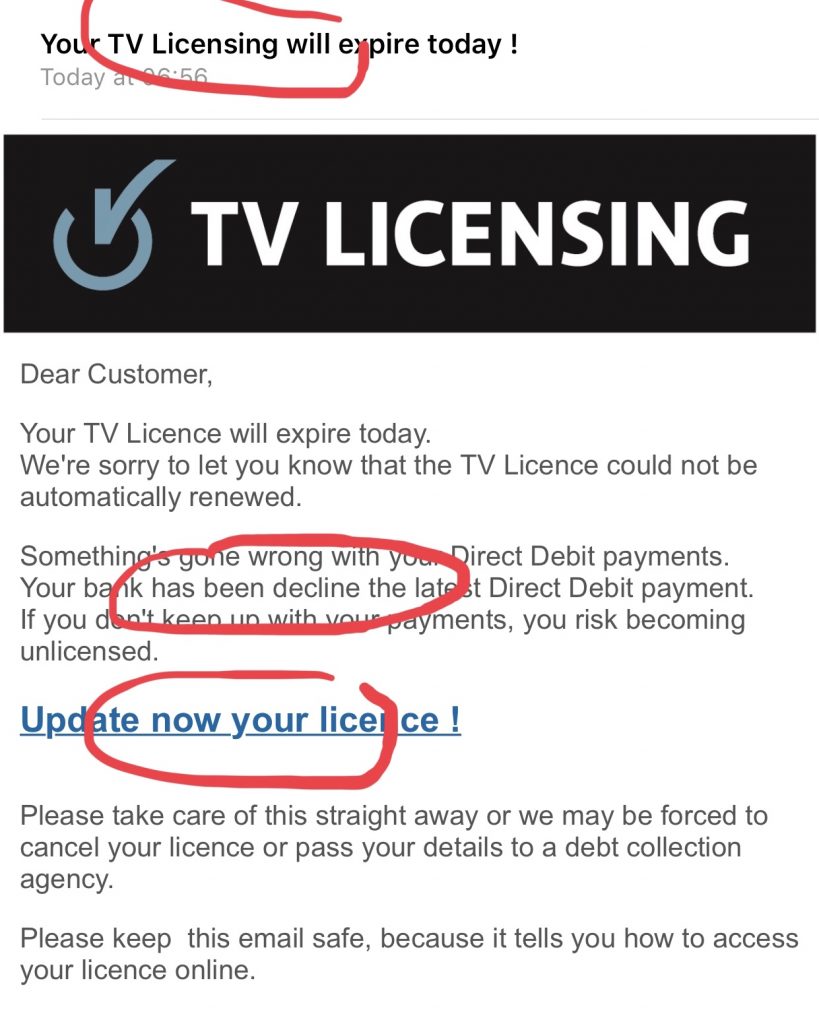
The smarter the hacker, the better the email. In this instance, the email has the look and feel of a real TV Licencing email. Here’s the first tweet I sent.
Here’s a good example of a scam email that could be legit at first glance. There’s the logo, and if you just scan the subject and text it sounds plausible. So what gives it away? I’ll share a few tell-tale signs in this thread pic.twitter.com/xtaKXdTokh
Often the biggest giveaway is that there are spelling or grammatical mistakes.
First a few phrases that don’t read right. In the subject it says “TV Licensing” not “ TV Licence”. Then there are a couple of sentences where the wording is off. We’ve all made mistakes in emails, but it’s a sign to watch out. pic.twitter.com/hZXnT83TO0
Highlighting a couple of obvious mistakes in the email
Tip two: Discover who really sent the email
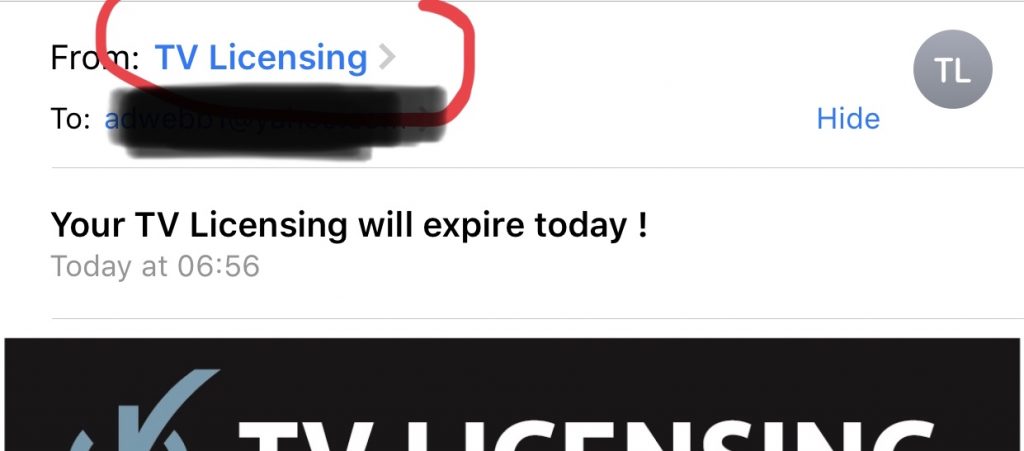
Just because an email says it’s from “TV Licencing” it doesn’t mean it is. Likewise any word in the “from” field could be masking a dodgy address. In fact anyone can change who an email appears from. I could send one that says it was from the Queen if I wanted. But you can’t hide the real email.
A good way to tell is to click the “From” name so you can see the email it was sent from. Normally it’s obviously spammy, but in this case it could – at a stretch – be legit (it’s not). If you’re not sure, then google the actual company rather than click any links. pic.twitter.com/KmRKkURbvZ
Click on the “From” name to see the sender’s email address
Here’s the real address hidden behind it. It’s closer than most scam emails to the real thing, but it should set alarm bells ringing. This is a major UK institution so you’d expect a “.co.uk” suffix. It’s best to Google the organisation to find the real web domain.
This is what’s revealed – and in this case it’s a similar web domain but NOT the real thing
What happens when you click through?
So, first, don’t click through if you have concerns about the legitimacy of the email. I did it here just to show you why you need to be extra careful at the email stage. First the fake TV Licencing site:
If you’ve fallen for this particular scam, or you’re worried you might have given your details after receiving similar emails, then you can report it to ActionFraud online or on the phone. They’ll also be able to give you some simple advice on what to do next. But if you’ve shared any passwords change them ASAP, and if you’ve given your bank details out call your bank immediately.
Some articles on the blog contain affiliate links, which provide a small commission to help fund the blog. However, they won’t affect the price you pay or the blog’s independence. Read more here.
[/box]
I’ve been using sites such as Booking. com and Expedia for years to find hotel rooms, and I’ve made some decent savings as a result.
But there are the odd little things on these and similar sites which have caught me out. And I’m not alone. The government’s Competitions & Markets Authority (CMA) has completed an investigation into misleading prices and results on sites like these. As a result six of the largest booking websites – Booking. com, Expedia, Trivago, Hotels. com, eBookers and Agoda have agreed to stop these practices.
But they don’t have to implement these until September 2019, so until then you could still get caught out. Plus there are many other booking sites who are yet to agree to these voluntary principles.
So here are a few things I’ve noticed some hotel booking sites do that could end up costing you more money.
Are hotel booking sites misleading you? What you need to watch out for
Hiding extra charges
Often the price you see displayed isn’t the total cost.
In the UK our tax (for hotels it’s VAT) is included, but it’s often added as extra overseas. I’ve just been to the USA and each State there will have a hotel tax, while many cities will have a city tax on top.
What’s frustrating is some sites will include this in the total price, while others will hide it elsewhere on the page. Confusingly, some sites do both depending on where you’ve clicked from.
I had this with Booking. com recently. Direct to the site prices were without tax, yet via comparison site Kayak (where I’d selected “all in” prices), the fees were included.
You might also find you have to pay “resort fees”, while Wi-fi, breakfast, parking are all often extra too.
All this information could be much, much clearer.
Charging you in the local currency
Longtime readers will know I’m well prepared to avoid currency conversion fees. But even with my selection of fee-free cards I’ve still managed to get caught out a couple of times.
There are a number of ways this can happen:
Though many hotels with free cancellation won’t charge you at the time of booking, some do – and it’s not always clear what currency you’ll be paying in. Booking. com for example makes the pound price most prominent. Yet when I booked for Las Vegas recently, on the final page, in smaller letters further down that it’s easy to miss, it says you’ll pay in the properties currency. It could be, and should be so much clearer.
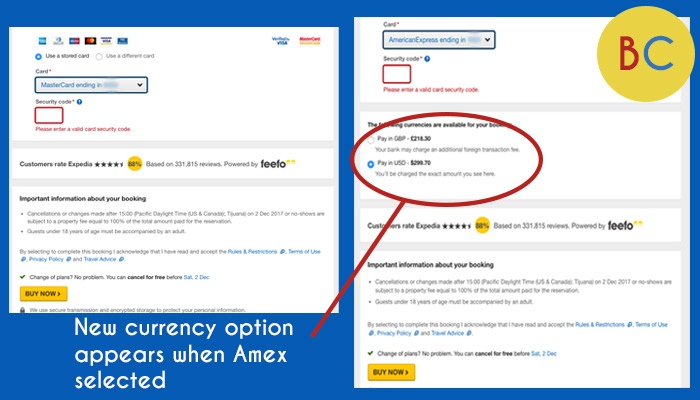
One booking I made with Expedia was listed as pounds, until I selected to pay with Amex. Then a small extra line appeared on the screen offering me the choice to pay in dollars or pounds. It wasn’t obvious that the extra option appeared, and the dollars option was pre-selected. It’s very easy to miss things like this and just click “Buy Now”. Again, it should be clearer – and more consistent!
The sites might ask for a card to hold the room, though at the same time making a big thing of “you won’t be charged for making this booking”. However if you don’t provide a different card when you check-out, it’s the first the card that will be charged – and that might come with heavy currency conversion fees. And even if you offer a different card at check-in, make sure that’s the one used. I found out too late that a hotel used the one from Booking. com rather than the one I gave them, costing me an extra £12.
Also, remember that any price for an overseas hotel quoted in pounds can go up and down with the exchange rates if you haven’t prepaid.
Sadly these variations seem down to the hotel you choose, rather than the booking site – meaning it’s going to be different every time you book, even if you use the same website for all your bookings. So you need to vigilant here.
Inflating discounts
Often when I search for hotels, it’s easy to be tempted by the biggest discount – and potentially pay more than I intended to get a “nicer” room. That sometimes works out and you get a real bargain.
But hotels notoriously have very fluid pricing. Weekends and peak seasons will generally cost a lot more than less popular times. So the 60% discount you’re seeing for a Tuesday might be the standard midweek price. And if you’re influenced by discount rather than price, you could get easily spend more than you need to.
Not putting the best deals at the top
The hotels you see at the top of a search result are likely there because the hotel has paid to be or offers a higher commission! So always change the order of the results to see all the options.
I tend to filter by review scores (usually 7 out of 10 and above), then order by price from low to high.
Pressuring you to book
These sites all use similar tricks: “only two rooms left!”, “This hotel has been booked 17 times today”, “77 people are looking at your location right now”.
It’s all there to push you to book now and not search elsewhere. But a lot of the time, people are looking at different dates to you. So take this with a pinch of salt.
If you are worried about rooms selling out then look for free cancellation. This way you’re protected if your plans change.
How to get an extra discount when using hotel booking websites
Despite all the issues above, I’ll still make most of my bookings via one of these websites – usually Booking.com or Expedia. Though price and the ability to cancel for free are big factors, I’m also able to knock the price down further by going via cashback sites.
The rates you get from TopCashback and Quidco vary from week to week, but it’s often possible to get 4% back at Booking. com and as much as 10% back from Expedia. A word of warning – as with any cashback purchase you might not get the money. It’s rare this happens, but sometimes sales don’t track, or they track at the wrong rate. So always make a note of when you clicked and the rate you are expecting so you can put in a claim.
One feature that’s also available is getting cashback on the bills you pay. So you could get 1% back on your Council Tax or water bills. It’s stuff we all pretty much pay for.
Since this type of account was introduced I’ve always said it makes sense for us to all have one of these current accounts – all offered by Santander.
If you’re looking to open a new account you can choose between the Edge or the Edge Up, while some of you might still have the 123 or 123 Lite.
So which is better? This article will help you decide on the best paying option for you.
Some articles on the site contain affiliate links, which provide a small commission to help fund our work. However, they won’t affect the price you pay or our editorial independence. Read more here.
Paid advertisement
Santander cashback current accounts compared
First a look at what these accounts offer. The focus of this article is on the cashback on bills, but as you’ll see some of them offer extra ways to earn money.
Available to all customers
Santander Edge
The Edge doesn’t just offer cashback on bills as you can get money back on some spending and a decent interest rate.
I wouldn’t bother with the debit card cashback as you can earn the same rate elsewhere without the caps and retailer restrictions. The interest could be worth grabbing – as long as you’re covering the fee with your cashback.
The Edge Saver is unbeatable for the first year – though you do need to factor in the fee if that’s not covered by cashback Here’s more on the Edge Saver account (full review)
7% (including 2.5% bonus for 12 months) on balances up to £4,000 via a separate Edge Saver account
Cashback (capped at £10 per tier each month)
1% on Council Tax, phone, mobile, TV and broadband, gas and electricity, and water bills
1% back on spending at supermarkets and on travel (trains, buses & fuel)
Requirements
Pay in £500 a month
Pay out at least two Direct Debits
Santander Edge Up
The Edge Up keeps the same cashback rates, but increases the monthly cap to £15 a month.
There’s no access to the Edge Saver. Instead you can earn 2.5% interest in the account on a hefty balance, but that can be beaten by savings rates at other banks.
1% on Council Tax, phone, mobile, TV and broadband, gas and electricity, and water bills
1% back on spending at supermarkets and on travel (trains, buses & fuel)
Requirements
Pay in £1,500 a month
Pay out at least two Direct Debits
Only available to existing customers
Santander 123
The Santander 123 current account is no longer available to new customers, but if you’ve already got one it’ll still earn you money back on your bills.
The 123 pays more cashback on some bills than the Edge, and you can earn money on Santander mortgages too. However, it comes with a higher fee and lower interest rates. I wouldn’t use this at all for interest as the rate can be easily beaten elsewhere.
Monthly Fee
£4
Interest %
2% on balances up to £20,000
Cashback (capped at £5 per tier each month)
1% on Council Tax, phone, mobile, TV and broadband bills and Santander mortgage repayments
2% on gas and electricity
3% on water bills
Requirements
Pay in £500 a month
Pay out at least two Direct Debits
Santander 123 Lite
This account is no longer available to new customers, but if you’ve already got one it’ll still earn you money back on your bills and with the lowest fee of the lot, so you need to know what it offers in comparison to the others.
Monthly Fee
£2
Interest %
None
Cashback (capped at £5 per tier each month)
1% on Council Tax, phone, mobile, TV and broadband bills and Santander mortgage repayments
2% on gas and electricity
3% on water bills
Requirements
Pay in £500 a month
Pay out at least two Direct Debits
Sign in to your online or app banking every three months
Go paperless
Get the best of our money saving content every week, straight to your inbox
Plus, new TopCashback customers get a high paying £18 welcome offer
Obviously there’s the chance to earn more from the 123 and 123 Lite due to the higher paying rates on gas, electricity and water. Plus if you have a Santander mortgage there’s extra you can earn there too.
However all three accounts have caps. For the 123 and 123 Lite it’s £5 cap per category, so the most you can possibly make each month is £15 – though for most homes that’s unlikely. The Edge caps bill cashback at £10 a month.
To work out how much you’ll make personally you’ll need to get your bills and put them into the cashback calculators on the Santander websites. Don’t forget to factor in the monthly fee, which will show in the calculator.
Santander cashback calculators
You can use a calculator on the Santander website to work out your return from both the Edge and Edge Up. It’s possible to also compare how much you’ll make to either the 123 or 123 Lite.
You’ll find this in the “Cashback” section when you click the arrow to expand. This calculator also has the option to work out how much you’d earn from debit card cashback and interest on savings, but I’d leave this blank unless you really don’t want to get better rates elsewhere.
A quick note: For Council Tax the cashback is calculated as if you pay it over 10 months rather than 12. Though the former is the default way I’ve always preferred the consistency of every month. If you pay by 12 months then you’ll need to multiply the amount you pay by 12, then divide by 10, and put that figure in the calculator. This applies to all three accounts.
Though the categories of cashback are quite broad and cover lots of bills, not every supplier will be included. For example, Giffgaff doesn’t appear in the eligible supplier search form. Do check how your supplier appears on your bank statement as that might be what’s listed.
Also, if you split bills with a partner or housemate and you pay from separate accounts then you won’t get the full benefit of this type of account. You could open up a joint account for these key bills, though there are risks you need to be aware of.
What I’d make in cashback on bills
Which account would be best for me?
If you’re a regular reader you won’t be surprised to know I’ve got as good a deal as possible on all my bills. I switch energy provider frequently (well, I did when this was possible) and ditched pay TV years ago. Plus I’ve haggled low prices on broadband and mobile phones.
Our water is on a meter and my Council Tax is quite high, but there’s not a huge amount we can do to reduce these further.
Bill
My monthly cost
123 Lite monthly cashback
123monthly cashback
Edge monthly cashback
Edge Up monthly cashback
Council Tax
£228
£2.28
£2.28
£2.28
£2.28
Broadband
£28
£0.28
£0.28
£0.28
£0.28
Mobile Phones (x2)
£16
£0.16
£0.16
£0.16
£0.16
Gas & Electricity
£250
£5
£5
£2.50
£2.50
Water
£40
£1.20
£1.20
£0.40
£0.40
Monthly fee
-£2
-£4
-£3
-£5
MONTHLYTOTAL
£6.92
£4.92
£2.62
£0.62
ANNUAL TOTAL
£83.04
£59.04
£31.44
£7.44
Cashback on bills vs interest in account
There is a extra option to consider. If your current account pays interest on the balance held there (rather than in a separate account that you’d have to transfer money over for), how much would that make? Could it better just to do that and forget about the cashback? Or does this help make the Edge Up more appealing as you’d automatically get both.
Let’s use my bills total from the table above, which comes in at £562 a month. If I left that cash in my account all month, and paid the direct debits on the last day, a rate of 3.5% (as Starling or the Santander Edge Up offers) would earn £19.67 interest if I did the same every month of the year.
That’s still not enough to chose this approach instead, or go for the Edge Up. You can of course combine the interest from Starling (or any other account) with cashback from Santander, by keeping the money in that account for as long as possible before you need to transfer it so the direct debits are paid.
Santander Edge accounts vs other interest rates
The table below shows how much interest you’d earn on £1,000, £4,000, £10,000, £20,000 and £25,000 when held in either the Santander 123, Santander Edge, Edge Up or a decent top-paying easy access account (at the time of writing) of 5%. The 123 Lite doesn’t pay interest.
These figures are without the fee, as I’m assuming that this is covered by the cashback you earn each year. If you aren’t earning the cashback I don’t see much point in using either the Edge or 123 for your savings.
The only exception is when you have a joint account which allows you to open two Edge Savers, and have at least £4,500 across the two accounts. And remember the 7% is only for one year and it then drops to 3.5%.
Anyway, back to the returns:
Amount saved
Interest earned in Santander 123 (2% up to £20,000)
Interest earned in Santander EdgeSaver (7% for 1st year only up to £4,000)
Interest earned in Santander Edge Up (3.5% up to £25,000)
Interest earned in 5% paying account
£1,000
£20
£70
£35
£50
£4,000
£80
£280
£150
£200
£10,000
£200
£280
£350
£500
£20,000
£400
£280
£700
£1,000
£25,000
£400
£280
£875
£1,250
It’s clear the Edge pays the most on up to £4,000, and for balances above that you’d want money in the best easy-access account.
Summary: Which is the best Santander account for you?
Should you get a Santander Edge or Edge Up account?
Let’s assume you don’t already have any of the accounts above (we’ll come back to whether you should swap from existing 123 accounts in a bit).
As long as you are paying those bills, and you’ll earn more than the monthly fee, it’s well worth getting one of these accounts. My preference is to go for the Edge as it’s cheaper and the extra features on the Edge Up won’t justify the additional £24 a year.
But I wouldn’t use it as my main account. There are far better options when it comes to the app and banking experience, plus a few with more lucrative extras.
Personally I’d set this up as an additional account solely to pay the bills. A standing order from your main account can transfer over the required cash each month, which will cover those bills.
Most of these bills are set amounts that won’t change without notice, so it requires little ongoing maintenance. Though obviously you’ll need to make sure you cover ones that can change each month – for example an increased mobile phone bill, or any annual increases to those bills (usually in April of each year).
Should you swap a Santander 123 for a Edge account?
The Santander 123 and 123 Lite current accounts closed to new customers in June 2023, but existing customers can keep their account open and continue to earn cashback.
I’d choose to keep hold of this account rather than opting for the Edge, especially if you have the 123 Lite. You’ll earn more back every month thanks to the higher rates on some bills.
Andy’s Analysis: Edge, 123 or 123 Lite?
If you have a 123 Lite then I’d absolutely keep it. If not, then my instinct is that the 123 will be the better account. That’s because despite a higher monthly fee you’ll get more cashback on energy bills, which can really add up while bills are so high.
Even if you’re also tempted by the Edge for the cashback at the supermarket, I’d look at alternatives that will earn you the same 1% at many more retailers.
And though the interest rate on the Edge Saver is hard to beat, I don’t think it’s enough to compensate for the lower cashback on your bills.
Santander switching bonus
Santander launched its first proper switching bonus in late 2021. The most recent offer, in March 2024 is for £185. This is a decent deal and is open to existing customers.
The Halifax Reward account offers a monthly reward. This has changed over the years – it currently offers a choice of £5 in your account, a cinema ticket or three digital magazines each month.
Plus, you can get three accounts and therefore three lots of the bonus, but you have to jump through a few hoops. Here’s everything you need to know.
** Update – the Reward Extra perks will end for new customers in June 2025, and for all in September. Here’s what we know so far**
What is the Halifax Reward current account?
The Halifax Reward account is a fee-based account that gives you a choice of freebies each month. You can only have three accounts in your name.
How much does the Halifax Reward Account cost?
The Reward account charges a £3 monthly fee, meaning it’ll cost you £36 a year. This isn’t unusual – many current accounts with benefits have a similar charge, including Barclays Blue Rewards, NatWest Reward and Club Lloyds.
However, you won’t pay the fee if you deposit £1,500 every month. This should be fine for most people if you have your salary paid into your account – you need to earn just under £21,500 a year to take home this amount after tax and National Insurance.
If not, you can pay in a smaller amount from another account, e.g. £500, withdraw it, pay it back in, then repeat it once more.
What rewards do you get?
To be eligible for one of the Reward Extras you’ll need to either spend £500 a month on your debit card or keep £5,000 in the account every day of the month.
You also need to pay in £1,500 a month every month to get your reward (and avoid the fee). You also need to keep your account in credit.
If you do these then you get to pick a reward. These are:
Three digital magazines a month from a selection of Hearst magazine titles (eg Good Housekeeping, Red)
One Vue cinema ticket a month (each valid for 12 months)
£5 a month
The one you choose is fixed for a year, so you can’t mix and match throughout the year. You can choose a new reward at the start of each 12-month anniversary.
It’s possible to track the progress towards your reward in the app so you know if you’re going to get it or not each month. You’ll also find when your 12 months are due to end so you can choose a new reward (if you want to change it).
Extra cashback offers
You can activate offers from a handful of retailers to earn cashback if spending with your Halifax card. I’ve hardly ever used it, but I check from time-to-time to see which shops are on there, just in case.
Bonus requirementsTo get the £240 switch offer, you need to complete a full switch with the Current Account Switching Service. Then, within 60 days of your initial switch request, you need to set up two active direct debits, deposit £1,500 into the current account, set up a Santander Regular Saver, and deposit £200 into it.
Regular saver8% (variable) regular savings account. Includes 5% (variable) bonus for 12 months
Existing customers?You can't have held a Santander account on 1 January 2026.
Halifax tends to run a switching deal two or three times a year, usually offering between £100 and £175. Get details of how it works, and any future promotions, in our Halifax switching offer analysis article.
£5 a month profit is better than similar rewards on offer elsewhere – as long as you are avoiding that monthly fee. That adds up to £60 over the year, which might be a lower value than the other options but you have the freedom to spend it how you wish.
The money is paid into your account each month. It’s worth noting that if you are a higher rate taxpayer you’ll be liable to pay extra tax on this bonus.
Free cinema ticket
The code you’ll get each month is valid for a year, and you can use two or more at the same time, saving on a family trip. They can also be used for pricier 3D screenings or VIP seats, increasing the value.
Standard Vue cinema ticket prices can vary between a fiver through to well over a tenner, and even more for the posh seats – it all depends on where you live.
If you’re paying close to a fiver, you’re better off getting the cash option – that’ll give you the flexibility to go to different cinemas (or not go at all).
But if you have an expensive Vue cinema near you and go once a month then the value of this reward could be pretty decent. Say your tickets are £10 that’s an annual reward worth £120. If VIP tickets are £18 it’s worth £216.
Even so, it’s possible to save on cinema tickets in lots of different ways, and those deals could work out as a better option. For example two-for-one tickets via Meerkat Movies or free Vue tickets via a Telegraph trial. Here’s our guide to the best ways to save at the cinema.
Our podcast
Listen to Cash Chats, our award-winning podcast, presented by Steve Alderton and Editor James Andrews.
You can choose your three titles from this selection:
Cosmopolitan
Country Living
ELLE
ELLE Decoration
Esquire
Good Housekeeping
Harper’s Bazaar
House Beautiful
Men’s Health
Prima
Red
Runner’s World
Women’s Health
Your picks will be digital-only, so you’ll need a tablet or computer to read them. The three magazines you choose at the start of the year will be the same ones you’ll get all year.
Get the best of our money saving content every week, straight to your inbox
Plus, new TopCashback customers get a high paying £18 welcome offer
Spend or save: which is best?
So you could be making anything from £60 a year (taking £5 a month) through to £200 (for top-end Vue tickets) from this account. But you need to factor in the requirement that you either need to spend or save a lot of money each month with Halifax. Here’s my take on each option.
Have £5,000 in savings
The option of £5,000 a month in your account seems relatively simple. Do this every month for a year and the £60 cash reward is the same return as putting that money in a 1.2% savings account. There are much better savings accounts on the market where this money might be better suited.
But I’m not a fan of this method. For a start that money has to stay there every single day of the month. So whether you need to use it, or the balance accidentally dips after a large purchase, you don’t get the reward.
The alternative is to spend £500 a month on your debit card. Do this exactly and you’ll earn £60 a year (if you take the cash option). That’s the equivalent of 1% cashback – so no real difference to using the top cashback cards.
However, if you spend more than £500 you won’t earn any extra money, reducing your equivalent rate. So do you just spend £500 and stop, then move over to your alternative card?
There are a couple of workarounds here that allow you to effectively earn double cashback on that £500 monthly spend.
Very simply, if you have a cashback credit card, you use your Halifax debit card to pay £500 off the bill every month. I’ve done this for the last year now and it works – you’ve just got to remember to do this before your direct debit for your card goes out of your account. I actually moved my Amex payment date from the start of the month to the middle to give me a bit more leeway.
I quite like the Halifax app as you can do pretty much everything on it without needing to log on via a desktop. Some of the key features:
Sharing bank details
You can send your sort code and account number via the app. There’s no option to copy these in the app, so you’ll need to share them to another app (eg notes or messages) and copy from there.
Card controls
All the main options are here:
View PIN and request new one
View and copy card details
Freeze card use abroad, online and / or in-person
Stop gambling payments
Set your own contactless limit
Alerts
You can get notifications for:
Debit card transactions
Weekly spending summaries
Money paid in and out
Sending and adding money
It’s easy to transfer cash to new and existing payees, and there’s no need for a card reader. You can scan a cheque using the app to add the cash to your account.
Insights and budgeting
There’s an easy-to-find option to see all your upcoming payments in one place, how much they add up to and when they’ll be paid. You can also manage and cancel subscriptions in the app – the ones paid via a debit card rather than a standing order or Direct Debit.
Tapping on a transaction will show on a map where it took place.
You can see seven years of transaction history on the app, which you can also search. It’s possible to export monthly statements from when you opened the account but only as PDFs.
Other features
You can also:
Use Face or Touch ID
Change personal details
Add accounts from other banks via Open Banking (just the major high street banks)
However, when compared to the likes of Starling and Monzo, the big absence is the lack of separate pots or spaces. All your money is together in the main account.
Summary: should you get it?
Andy’s Analysis
If you have £5k to save or already use a cashback card for spending, then the £5 reward isn’t better than what you can get elsewhere.
But thanks to the debit card hack, I think it’s well worth getting one of these accounts to claim the reward alongside your other cashback card. And then another two times with additional accounts.
Plus the app is actually really decent and does most things you’ll need. So all in this is a good account to have and perhaps even use as your main account.